Showing posts with label Devops. Show all posts

Wednesday, 4 May 2016

Deploying Azure websites and webjobs using your CI system with msbuild and azure powershell cmdlets

There are lots of tutorials detailing how to send web apps and web jobs up to azure as part of your CI pipeline but I've found them all lacking, mainly in that they require you to upload to Azure in the same command as performing your build.
Often this command looks like the following:
msbuild.exe foobar.csproj /p:DeployOnBuild=true /p:PublishProfile="azurePubProfile" /p:Configuration=Release
This simultaneously builds, configures and publishes the project to azure.
 
This is unacceptable to me as I want to promote the same built artifact through many environments ci-test-preprod-prod where the only thing to change is the config getting deployed to each. I don't want to keep building the code over and over when I deploy which has many issues ranging from changes in the code between deployments to changes in the environment of the build machine. I want to know that what is getting deployed to prod is exactly the same binaries as was deployed and tested in all previous environments. To achieve this we need to separate the building of the artifact from the deployment.

What follows is the method we are now using to build and deploy our services to Azure. It breaks down into 4 simple steps
  1. Build your solution, firstly restoring any nuget packages if needed
  2. Configure your service for the target environment and zip up the artifact
  3. Configure the powershell session for azure
  4. Publish the zipped artifact to azure

App service (websites)

Build

Firstly build your solution, if using any nuget packages restore these first
nuget restore
Perform the build on the solution
msbuild foobar.sln /t:build /p:configuration=release /p:OutDir=BUILD_OUTPUT_PATH
Grab the published website from ./foobar/BUILD_OUTPUT_PATH/_PublishedWebsites/foobar and safe it to your artifact store of choice.

Deploy

Firstly apply the correct config for your target environment for this deployment to the artifact saved from the build. there are many ways to do this so i wont go in to it here.

Next zip up the deployable artifact
Add-Type -Assembly System.IO.Compression.FileSystem
$compressionLevel = [System.IO.Compression.CompressionLevel]::Optimal
[System.IO.Compression.ZipFile]::CreateFromDirectory($sourcedir, $zipfilename, $compressionLevel, $false)

Prepare the powershell session for the upload to azure
Load in your azure cert
Import-AzurePublishSettingsFile azure-credentials.publishsettings
Select the desired subscription
Select-AzureSubscription 00000000-0000-0000-0000-000000000001
Publish the website using the azure cmdlet
Publish-AzureWebsiteProject -Package buildoutput.zip -Name foobar -Slot 'staging'

Webjobs

As above except the location of the built artifact foobarjob/BUILD_OUTPUT_PATH
And the cmdlet for creating the webjob
New-AzureWebsiteJob -Name foobar -JobName foobarjob -JobType Continuous -JobFile .\buildoutput.zip

Conclusion

It turns out its actually really easy to achieve the result we desired, mainly the repeatable deployment of a known, tested build artifact to any environment we like.

We use GoCd from thoughtworks to orchestrate the above process through the pipelines feature. When all this is combined with staging slots, blue green deployments and the like you get a really robust process, excellent auditability, a solid rollback strategy and not to mention peace of mind when pushing to prod.

Id love to hear how you achieve the same results, whether its through version control strategies, azure deployment slot strategies or something else.
Let me know.

Tuesday, 29 March 2016

The fallout of going the microservice route. Build and deploy headaches

Build/Deploy issues with GoCd

As you may have seen in a previous blog post we have a lot of pipelines, over 500 now and its set to grow by another 200 in the next month as we bring another 3 environments up. 700 pipelines is too much for a vanilla go instance to handle, the server can sometimes wait 3-4 minutes before detecting a check-in or to respond to a manual pipeline click.
I'm not having a go at go (no pun intended) i love it i think its very good at its job, but when you get to this scale apparently the embedded H2 DB starts to be a bottleneck and so you need to upgrade to the postgreSQL plugin which adds more power on the back end which would solve some issues I've seen. But there is also an issue with the main pipelines UI which can take 10+ seconds to render with 500 pipelines on the page at once, I put this down to browser performance as you can see the call to the server coming back quite quick with the markup, its just a very big page (15000+ divs, 1600+ forms, 4300+ input fields all with associated styling and javascript). So with all this in mind we decided to split up our go server into six smaller instances.

Go server/agent setup

We have over 70 micro-services mainly written in .net but with a scattering of node and spa apps (detailed here), each is independently deployable and so we have decided to split them based on service boundary which we have roughly 6. So we have decided to create 6 go servers and split the workload across all six so that each server will only be handling 1-2 hundred pipelines each.

There are three consequences to splitting up the servers like this: One is that any templates are going to get duplicated, and you will have to keep track of failing builds on six servers instead of just one which means you will need to log into six servers and remember which services are on which go server instance. But by splitting the work by service boundary we will keep the value stream map intact where by we would loose it if we had split the servers by deployment region of which we now have three (each with a test, preprod and prod environment).

Installing multiple go agents on one VM, pointing at multiple different go servers

So we have six VMs each with a go server installed, and now by the use of powershell six agents on each VM. Each VM has an agent for each of the servers so that the workload can be spread evenly. The problem with this is that whilst a given VM can host several agents (read this) all the agents will point back to the same go server because the install uses an environment variable. The solution to this is to hack the config\wrapper-agent.conf file, change all the instances of '%GO_SERVER%' replacing it with 'go-serviceboundary1.mydomain.com' which is the DNS entry for the go server you are working for.

Given i was creating six agents on six machines i didn't want to do this by hand so i created a script to do it for me (found here) the more interesting bits are summarised below:

Download the latest go agent:
$goSetupExe = "go-agent-16.2.1-3027-setup.exe"
$client = new-object System.Net.WebClient
$client.DownloadFile("https://download.go.cd/binaries/16.2.1-3027/win/$goSetupExe", "C:\go\$goSetupExe")

Command line install the first agent
.\go-agent-setup.exe /S /SERVERIP=go-serviceboundary1.mydomain.com /D=C:\go\agent1
Copy the install to a new instance
new-item "C:\go\agent$agentNumber" -ItemType Directory
Copy-Item "C:\go\agent1\*" -Destination "C:\go\agent$agentNumber" -Recurse
Remove-Item "C:\go\agent$agentNumber\config\guid.txt"
Remove-Item "C:\go\agent$agentNumber\*.log"

Rewrite the config
(Get-Content "C:\go\agent$agentNumber\config\wrapper-agent.conf").replace('go-serviceboundary1.mydomain.com', "go-$boundedContext.mydomain.com") | Set-Content "C:\go\agent$agentNumber\config\wrapper-agent.conf"

(Get-Content "C:\go\agent$agentNumber\config\wrapper-agent.conf").replace('c:\go\agent1', "c:\go\agent$agentNumber") | Set-Content "C:\go\agent$agentNumber\config\wrapper-agent.conf"

Create and start the second service instance
New-Service -Name "Go Agent$agentNumber" -DisplayName "Go Agent$agentNumber (go-$boundedContext.mydomain.com)" -Description "Go Agent$agentNumber (go-$boundedContext.mydomain.com)" -StartupType Automatic -BinaryPathName "`"C:\go\agent$agentNumber\cruisewrapper.exe`" -s `"c:\go\agent$agentNumber\config\wrapper-agent.conf`""

Start-Service "Go Agent2"


It works really well for getting a new setup running quickly, and if i ever need to add a new go server and new agents this will be easy to extend to quickly get up and running.

Feedback

It would be great if i could get some feedback as to whether this is a good idea or not, or else how best to split things up, but i feel this is a nice pragmatic solution with minimal downsides.

Wednesday, 24 February 2016

From Monolith to Microservices - Moving from 7 to 70 services with C# and automation, automation, automation

In this post I want to give a feel of our journey from monolith to microservices, to highlight the automation that is required to do this from a vary high level (you wont see any code samples in this post).

But first a little history

We are moving from a monolith towards a microservice EDA (Event Driven Architecture). Its been over 2 years in the making but we are getting there (although we still have 2 hefty monoliths to break down and a few databases as integration points to eliminate). We are a Microsoft shop using VS2015, C# 6, .net 4.6, NServiceBus and plenty of azure services. I'm sure you have read elsewhere that you don't move towards micro-services without adequate automation, well we have invested heavily in this in the last few years and its now paying off big time. It feels like that at the moment we have a new service or API deployed to prod every other week.

There are many benefits to a microservice style of architecture of which I'm not going to list them all here, this post is more about automation and tooling in the .Net landscape.

The tools are not the job

Sometimes you get complaints that you are spending too long on DevOps related activities. That 'the tools are not the job' implying that you should be writing code not tooling around the code!! That you should be delivering features not spending so much time getting things into production!! This might have been true in the good old days when you had one monolith, maybe two, with shared databases. It used to be easy to build it on your dev machine and FTP the build up to 'the' live server (better yet MSDeploy or publish from visual studio). Then just hack around with the config files, click click your done. In those days you could count on Moore's law to help your servers scale up as you increased load, you accepted the costs of bigger and bigger servers if you needed them.

But in this modern era scaling out is the more efficient, and cheaper solution especially with the cloud. Small services enable you to scale the parts of the system that need it rather than the whole system. But this architectural style comes at a cost, imagine hand deploying your service to each node running your software (there could be tens)!
We have currently over 70 core services/apis and over 50 shared libraries (via nuget). we run operations in 2 different regions each with a different configuration, different challenges and opportunities. Each region has a prod and preprod environment. We have a CI system and a test environment which is currently being rebuilt.
So 'the tools are not the job', maybe true, we do write a lot of C#, but without the tooling we would be spending most of our time, building things, deploying things and fixing the things we push to prod in a incorrect state.

Technology, Pipelines and Automation

We are a Microsoft shop dealing mainly with C#6, .net 4.6, ASP.MVC, WebApi, SQL Server, nservicebus, Azure, Rackspace and powershell, lots of powershell.

We use GoCd from thoughtworks as out CI/CD tool of choice, and consequently have invested heavily in this tool chain over the last 2 years. Below is a 10,000 foot view of the 400+ pipelines on our Go server. (rapidly moving towards 500)
https://go.....com:8154/go/pipelines
Below is a rough breakdown of the different pipelines and their purposes.

01 Nuget packages - 50+

The nuget packages mainly contain message definitions used for communications between services on the service bus (MSMQ and Azure Queues). Generally each service that publishes messages has a nuget package containing the messages so that we can easily communicate between services with a shared definition.
We also have a number of shared utility packages, these are also nuget packages.
These pipelines not only build and test the packages but also publish to our internal nuget feed on manual request. The whole process of getting a new package into our nuget package manager is automated, very quick, painless.

These pipelines have 3 stages:
1. Build - After every commit we build 2 artifacts, the nuget package file and a test dll. These 2 artifacts are stored in the artifact repository.
2. Test -  Upon a green build the tests run.
3. Publish - If the tests are green we have a push button publish/deploy to our internal nuget feed.

02 Automation packaging - 3

This contains powershell that is needed to perform builds and deploys. These packages are deployed to a common location by Go (section 05) on to all the servers that contain agents.

03 Databases - 14 

We actually have over 20 databases but using CI to control the deployment of these is only just gaining traction, we are currently building this side up and so not all DBs are in the CI pipeline yet. Most are still deployed by hand using Redgate tooling, this makes it bearable but we are slowly moving to an automated DB deploy pipeline too. 

04 Builds - 70+

Every service/api has a build pipeline that is kicked off by a checkin to either SVN or Git. They mainly consist of 2 stages, Build and Test.
Build not only compiles the code into dlls but also transforms the configuration files and creates build and test artifacts along with version info files to enable us to easily see the version of the build when it is deployed on a running server.
Test usually consists of two stages, unit and integration. Unit tests don't access any external resources, databases, file systems or APIs. Integration tests do, simples.
Only pipelines with a green build and test stage are allowed to be promoted to test or preprod environments.

05 Automation deployment - 10+

These pipelines deploy the automation as defined in section 02 to all the go agents. Region one has 3 servers in prod and preprod so 6 agents. Region two has 2 in prod and preprod and a further 2 that contain services that are deployed to by hand (legacy systems still catching up). Then we have 2 build servers and some test servers also. All these services have dependencies automatically pushed to them when the automation (which is mainly powershell) changes. Al these pipelines are push button rather than fully automatic, we want to keep full control of the state of the automation of all the servers.

06 Region one prod - 40+

07 Region one preprod - 40+

08 Region two prod - 50+

09 Region two preprod - 60+

Each Region has 2 identical environments, one for preparing and testing the new software (preprod) and one that is running the actual system (prod). They are generally the same but for a small number of services that cant be run on preprod environments (generally gateways to other external 3rd parties) But also services that are still being built and not yet on prod.
These pipelines generally take one of 2 forms. APIs and services.
The deployment of said APIs and services is documented here: http://foldingair.blogspot.co.uk/2014/10/adventures-in-continuous-delivery-our.html

Since that blog article was written we have started to move more and more to Azure PAAS, primarily app services and web jobs with a scattering of VMs for good measure, but in general the pattern of deployment stands.

10 Region two test system - 60+

11 Region two test databases - 6

We are currently in the process of building up a new test system (services and databases) which is why the stages are not showing color as yet. In the end we will be deploying every piece of software every night and running full regression tests against it in the early morning to ensure everything still integrates together as it did yesterday.

Totals

432 pipelines and 809 stages (This was 4 weeks ago when i started to draft out this post, i know, i know, anyway it is now 460+ pipelines and 870+ stages). I wonder if this is a lot? but if you truly are doing microservices its inevitable! isn't it?

The value stream map of a typical service  

Typically one service or API will be associated with 6 pipelines and potentially pull dependencies from others via nuget or other related pipelines. A typical value stream map is shown below:

Typical Value Stream Map

The circle on the left is source control detailing the check in that triggered the build (first box on the left). Then the 5 deployment pipelines run off this, test is shown at the bottom pulling directly from the build artifact. The 4 above are the 2 regions, prod on the right pulling from preprod in the middle, that pulls the artifact from the build.

This gives us great audit functionality as you can easily see which builds were deployed to prod and when it happened. Most importantly you cant even deploy to prod unless you have first gone through preprod, you cant go to preprod if any tests failed, and the tests will only run if the code actually built.

Config

Config is also dealt with as part of the build and deploy process. Config transforms are run at the build stage and then the deployment selects the config to deploy based on a convention based approach meaning all deployments are the same (templated) and config is easy to set up in the solution itself.
Whilst dealing with config in this manner its not the perfect solution it has served us really well so far, giving us confidence that all the configs of all services are in source control. We are really strict with ourselves on the servers also, we do not edit live configs on the servers, we change them in source control and redeploy. This does have its issues esp if you are only tweaking one value and there are other code changes now on trunk, but we manage. And are currently actively exploring other options that will allow us to separate the code from the config but keep the strict audit-ability that we currently have.

Monitoring and alerts

Monitoring a monolith is relatively straight forward, its either up and working or its not! With many small services there are more places for problems to arise, but on the flip side the system is more resilient as a problem wont cause the whole to come tumbling down. For this reason monitoring and alerts are vitally important.

Monitoring and alerts are handled by a combination of things. NServiceBus Service pulse, splunk, go pipelines (cradiator), monitor us, raygun, custom powershell scripts, SQL monitoring, azure monitoring, rackspace monitoring and other server monitoring agents. All these feed notifications and alerts into slack channels that developers monitor on the laptops at work and on our phones out of hours. We don't actually get too many notifications flowing through as we have quite a stable platform given the number of moving parts, which enables us to actually pay attention to fail and be proactive.

Summary

With each region we are planning to bring on board there are ~ 120-150 pipelines that need to be created, luckily the templating in GoCd is very good, and you can easily clone pipelines from other regions. But managing all this is getting a bit much.

I just cant imagine even attempting doing this without something as powerful as GoCd.

So the tools are not the job! maybe, but they enable 'the' job, without this automation we would be in the modern equivalent of dll hell all over again.

Feedback

What are your thoughts reader? Does this sound sensible? Is there another way to manage this number of microservices across this number of servers/regions? Please sound off in the comments below.

Monday, 30 November 2015

Do we need to deploy clean up work if there is no additional functionality? i.e no (perceived) business benifit.

Background

We recently did some work to a number of services where all we were doing was removing some old functionality that is no longer used (obsolete code). Removing messages, handlers, classes, tests. I like deleting code, it makes things simpler, less logic to break, less places for bugs to hide. Once we finished, we wanted to get all of this released to prod ASAP. We tested all of the areas affected in a large system level test in the preprod environment, all of the services (and others that had not changed) working together.

But we had push back. 

Push back

The question was: Why do you need to release this clean-up in advance of any further work?
By doing so you are making this an active rather than passive deployment with associated extra risk and double the cost.
If you are removing unused code you can just deploy with the next addition/change to code because by testing that you are implicitly testing that absence of code. Even if the new code isn’t affected, then our deployment checklists cover that situation too – we have already double checked this removal/clean-up of code won’t have an impact on production

Rebuttal

I broke this down into a number of sections. A number of questions that I thought were being asked in the statement.

Question: Why do many releases instead of one, isn’t that more risky?
This is a question from the old skool of thought, releases are big bad things we need to do as few as possible.
Answer: I would say many small releases are inherently less risky.
If (very unlikely but) if something goes wrong it will be less clear what caused the issue. Was it new functionality, or the clean-up work that is the culprit?
If we release now, we know what to monitor over the coming days, and have to monitor less
If we don’t deploy all 8 things, someone else will (at some point and in some cases many months in the future). This poor soul will need to decide if the changes we did need testing, what the consequences of the changes are, and worry about if there are other dependent services to deploy.
Each service is push button, so deploy time is small.
Rollback is not hard if we need it with no business consequences at the moment. In future if we release with other functionality and the changes we have made break something we need to rollback new functionality too.

Question: If we are removing code why the need to release anything? There is no new functionality to release.
I guess this is a question about business value, no new business value no need to release.
Answer: That is true, its mostly removing old code and cleaning up. But its just as critical, almost more so to get this out in a small release sooner, as we may (again unlikely but possible, we are human) have removed something we should not have.

Question: Won't it be more to test doing it twice?
This assumes that we manually test everything on every release. where actually we only test what has changed manually in conjunction with automated testing for the rest.
Answer: We have already done good full end to end testing last week of the 8 things affected. If we wait until next week or the week after we will have to do the tests again as the versions of things to be released will all be different by then, so will need to test the 8 deployable things again full stack = extra 1 day

Other reasons for deployment.
The changes, what we did and why we did it, are still fresh in our minds. The longer we leave it the less sure we are that we will be doing the right things.
Its not critical, but I'd prefer not to do a partial deployment (service-X is going to get released soon) I'd like the rest of the clean-up to be deployed too.
Ideally prod and preprod are as same as possible (for environmental consistency and testing reasons). Any differences between the test system of preprod and prod invalidates other testing efforts. Because in prod services will be integrating with a different version of other services than that are in preprod making like-for-like testing impossible.

Conclusion

I maintain there is business benefit in doing the deployment now, and deploying all 8 services at that. To be fair businesses, managers, stakeholders, even developers (especially senior ones) have all seen their fair share of long deployments, failure and difficult rollbacks. Leading, ultimately to a fear of deployment. So it's natural to want to avoid the perceived risks. But perversely by restricting the number of deployments you are actually increasing the likelihood of future fail.
A core philosophy of the devops culture is to release early and often (continuous delivery). By doing the things you find painful more often you master them and make them trivial, there by improving your mean time to recovery.

The business benefit is ultimately one of developer productivity, testability and system up-time

Tuesday, 17 November 2015

Splunk alerts to slack using powershell on windows

We use Splunk to aggregate all the logs across all our services and APIs on many different machines. It gives us an invaluable way to report on the interactions of our customers through new business creation on the back-end servers running on NServiceBus, to the day to day client interactions on the websites and mobile apps.

We have been investing in more monitoring recently as the number of services (I hesitate to use the buzzword micro, but yes they are small) is increasing. At present pace I'd say there is a new service or API created almost each week. Keeping on top of all these services and ensuring smooth running is turning into a challenge, which splunk is helping us to meet. When you add service control, pulse and insight from particular (makers of NServiceBus) we have all bases covered.

We have recently added alerts to splunk to give us notifications in slack when we get errors.

The Setup

We are sending alerts from splunk to slack using batch scripts and powershell.

Splunk Alerts

First set up an alert in splunk, This splunk video tells you how to create an alert from a search results. We are using a custom script which uses arguments as documented here. Our script consists of 2 steps a bat file and a powershell file. The batch file calls the powershell passing on the arguments.

SplunkSlackAlert.bat script in C:\Program Files\Splunk\bin\scripts
@echo off
powershell "C:\Program` Files\Splunk\bin\scripts\SplunkSlackAlert.ps1 -ScriptName '%SPLUNK_ARG_0%' -NEvents '%SPLUNK_ARG_1%' -TriggerReason '%SPLUNK_ARG_5%' -BrowserUrl '%SPLUNK_ARG_6%' -ReportName '%SPLUNK_ARG_4%'"

SplunkSlackAlert.ps1 lives alongside
param (
   [string]$ScriptName = "No script specified",
   [string]$NEvents = 0,
   [string]$TriggerReason = "No reason specified",
   [string]$BrowserUrl = "https://localhost:8000/",
   [string]$ReportName = "No name of report specified"
)

$body = @{
   text = "Test for a parameterized script `"$ScriptName`" `r`n This script retuned $NEvents and was triggered because $TriggerReason `r`n The Url to Splunk is $BrowserUrl `r`n The Report Name is $ReportName"
}

#Invoke-RestMethod -Uri https://hooks.slack.com/services/AAAAAAAAA/BBBBBBBBB/CCCCCCCCC -Method Post -Body (ConvertTo-Json $body)

Slack Integration

You can see the call to the slack API in the invoke-restmethod, the slack documentation for using the incoming web hook is here. there is quite a rich amount of customization that can be performed in the json payload, have a play.

Before you can actually use this you must first setup slack integration as documented here which requires you to have a slack account.

The fruits of our labor:


All the script code is given in my gist here.

Credits:

Thanks to my pair Ruben for helping on this, good work.

Tuesday, 16 June 2015

Advanced filtering and navigation on Thoughtworks Go Cd with tamper monkey

Our problem

We use Go from Thoughtworks to manage the build and deployment of all our software. Attached below is a screen shot of the current pipelines.

As you can see we have quite a lot going on. In fact we have 390 pipelines (55 services and api builds, 40 nuget package build/publish, and the rest are deployments to our 5 environments from test through preprod and live). There are 730 stages in total (Build, test, deploy, ect). And we have 20 go agents running on different servers.

So you can imagine finding the pipeline you are looking for is tough. We have adopted naming conventions which help but its really quite difficult to find what you are after with the supplied search capabilities.

Also its very tricky to see if anything is broken (red), there is just no way you will notice it in all the pipelines.

As an aside we are using cradiator to give us an information radiator of all our build and deployment pipelines (I blogged about this a year ago) but with over 700 stages its really in need of an overhaul but that's for another blog post.


The solution

We have created a tamper monkey script (found here) that enhances the functionality of the Go pipelines view, allowing you to filter the visible pipelines by status or by keyword.
 

There is also the issue of navigating between the settings and the pipeline history, and visa versa. Often you are investigating a failure, you find the problem in the history and then want to change the settings. Well there is no link, so we created one for you to easily navigate between the 2 parts of the UI easily.

Notice the "Settings" link above and the "History" link below both in the header

The script can be found here: https://gist.github.com/DamianStanger/d1db873e9297b34160ce#file-go-cd-tampermoneyscript-js

Install

Firstly you need to get tamper monkey installed in your browser, you can get it from the chrome web store or http://tampermonkey.net/


Then from the tamper monkey dashboard add the script and tell it what urls to attach itself to. The update url needs to be your instance of Go (our update URL is https://goserver:8154/go/* ). On the settings tab I also add in a couple of user includes to https://goserver:8154/go/home and https://goserver:8154/go/pipelines.

That's it, instantly enjoy better productivity. I imagine this is a good enhancement even if you only have a tenth of the pipelines we have.


Wednesday, 15 October 2014

Blue green web deployment with powershell and IIS

I wanted to follow up my earlier post (about our current CD process) with a more technically focussed one, one that can describe the nuts and bolts of the actual BlueGreenDeployment.

Technology 

Powershell, powershell and powershell, oh and windows, IIS and Go (build server)

Process

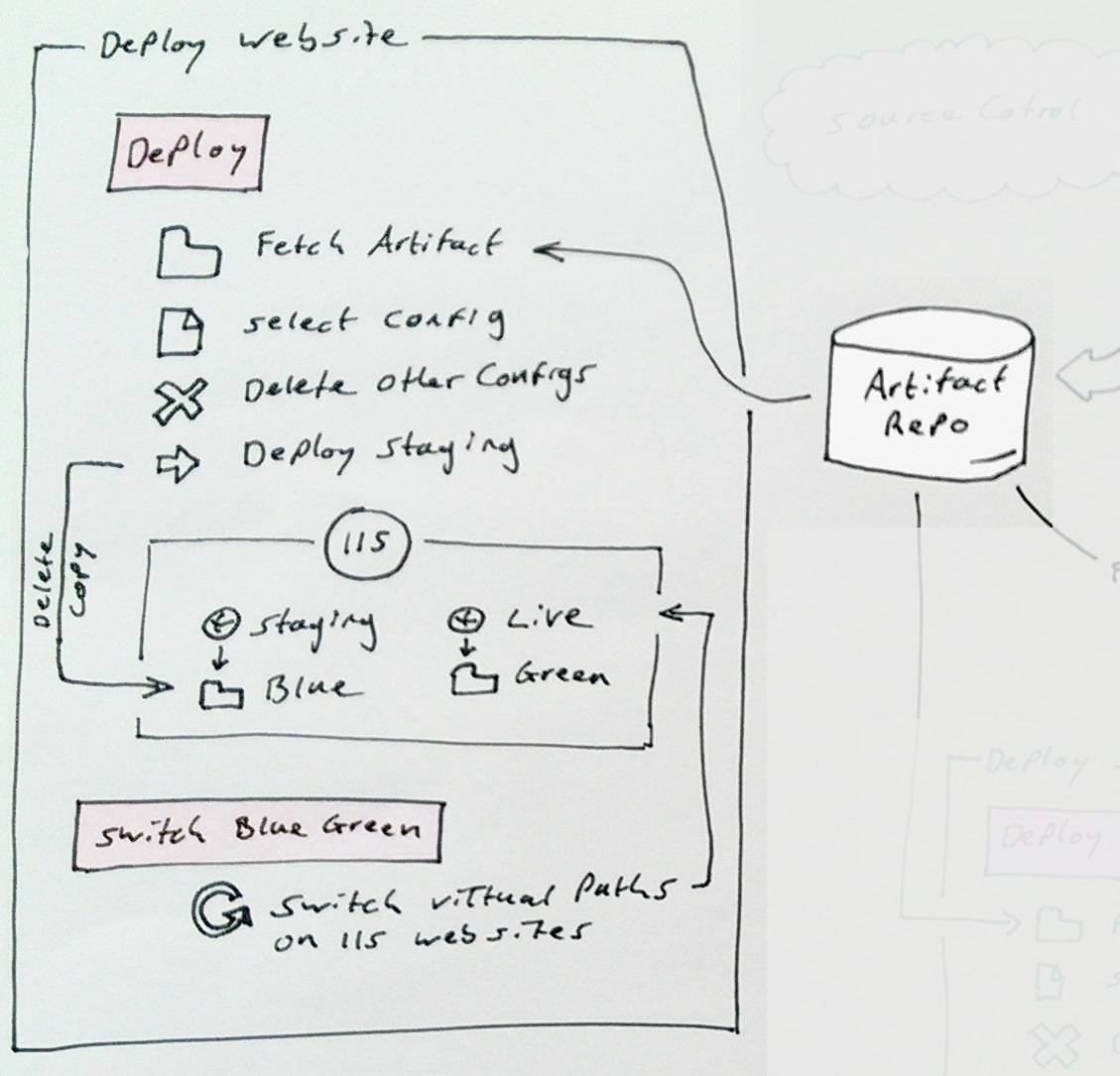
As I described in my earlier post the blue green web deploy consists of these steps:


1. Deploy
1.1 Fetch artifact
1.2 Select the config for this deployment
1.3 Delete the other configs
1.4 Deploy to staging (delete then copy)
1.5 Backup live

2. Switch blue green
2.2 Point live to new code
2.3 Point staging to old code

Blue Green Deployment

Before diving in to the details I should firstly convey what blue green deployments are, and what they are not.
There are a few different ways to implement blue green deployments but they all have the same goals:
1. Allow testing on live without actually being live.
2. Enable deployments to have the smallest possible impact on the live service as possible.
3. Give you an easy roll-back path.

This can be accomplished in many ways. Techniques include DNS switching, directory moving, or virtual path redirecting. 
We have chosen to do IIS physical path redirecting. This allows us to do the same technique on all our environments from test to live, same scripts, same code, and doesn't cost as much as requiring multiple servers which DNS switching would require.

Commands used for this demo are

PS> .\Create-Websites.ps1 -topLevelDomain co.uk
PS> Deploy-Staging -source c:\tmp -websiteName foobarapi -domainName foobar.co.uk
PS> Backup-Live -WebsiteName foobarapi -DomainName foobar.co.uk
PS> Switch-BlueGreen -WebsiteName foobarapi -DomainName foobar.co.uk

The code I'm going to talk through is all located here: https://github.com/DamianStanger/Powershell

Conventions used:

All websites are named name.domain and name-staging.domain
All backing folders are in c:\virtual and are named name.domain.green and name.domain.blue
You don't know if blue or green is currently serving live traffic.
Backups are taken to c:\virtual-backups\name.domain
Log files always live in c:\logs\name.domain
There is always a version.txt and bluegreen.txt in the root of every website/api

In this example I'm using name=foobarapi and domain=foobar.co.uk

The technical detail

This is the meaty stuff, it consists mainly of powershell, and should work no matter what CI software you are using. I can heartily recommend Go by Thoughtworks. It has a built in artifact repository and brilliant dependency tracking through its value stream map functionality.

Setup IIS and backing folders

To test my deployment scripts you will firstly need to set up the dummy/test folders and IIS websites. For this you can use this script: Create-Websites.ps1. I'm not going to go into detail of the script as its not the focus of this post but it creates your app pool and website.

The code is exercised with the following:
setupWebsite "foobarui" "foobarui-test" $true "green"
applyCert("*.foobar.*") <<optional if you want the sites to have an ssl cert applying>>

This will create 2 websites on IIS pointing to the green and blue folders as per the conventions outlined further above. Finally apply an SSL certification using powershell, this command will apply the SSL cert to all the websites in this instance of IIS.
To remove the created items from IIS issue commands similar to this:
PS> dir IIS:\AppPools | where-object{$_.Name -like "*.foobar.co*"} | Remove-Item
PS> dir IIS:\Sites | where-object{$_.Name -like "*.foobar.co*"} | remove-item
PS> dir IIS:\SslBindings | remove-item

Once you have the websites correctly set up you can then utilise the deploy blue green scripts :-)

Deployment

The Blue Green deployment module is located here: BlueGreenDeployment.psm1 and will need importing into your powershell session with the following command:
PS> Import-module BlueGreenDeployment.psm1
Once you have the module imported you can issue the following commands:
PS> Deploy-Staging -source c:\tmp -websiteName foobarapi -domainName foobar.co.uk
PS> Backup-Live -WebsiteName foobarapi -DomainName foobar.co.uk
PS> Switch-BlueGreen -WebsiteName foobarapi -DomainName foobar.co.uk

Lets dig into these one by one.

1. Deploy-Staging
This is quite straight forward. Find the folder that is currently serving staging and copy the new version there. The interesting bit of code is the method of determining which folder to replace with the new version. IsLiveOnBlue and GetPhysicalPath work together to determine the folder in use on staging. Notice the retries inside GetPhysicalPath I found that sometimes IIS just doesn't want to play, but if you ask it a second time it will?? Don't ask..
The code that actually determines the physical path is:
$website = "IIS:\Sites\$WebsiteName.$domainName"
...
$websiteProperties = Get-ItemProperty $website
$physicalPath = $websiteProperties.PhysicalPath

The rest of the powershell is relatively straight forward

2. Backup-Live
Backing up live is again pretty standard powershell. Again determine the folder that is serving live then do a copy. Done.

3. Switch-BlueGreen
Performing the switch is actually really easy when it comes to it. Firstly determine which folder (blue or green) is serving live (same code as the deploy step) and then switch it with the staging website.
Set-ItemProperty $liveSite -Name physicalPath -Value $greenWebsitePath -ErrorAction Stop
The only added complication is the rewriting of the log file location in the web.config. Log4net only really works well if one process (web site) uses one log file. Again you can look this up yourselves as this is an aside to the main purpose of this post.

Conclusion

The interwebs in general are full of articles/opinions/tales of how bad windows is to automate, it actually winds me up. Maybe it used to be true but I've been finding that with powershell and Go I've been able to automate anything I need. It's so powerful. Don't let the microsoft haters stop you from doing what needs to be done.

The blue green deployment technique outlined here is working really well for us at the moment and has helped us to take our projects live sooner/quicker and with more confidence.

Automation for the win.

Sunday, 12 October 2014

Adventures in continuous delivery, our build/deployment pipeline

Overview

We have been undergoing a bit of a dev-ops revolution at work. We have been on a mission to automate everything, well as much is as possible. Exciting times but we are still only just setting out on this adventure, I wanted to document where we are currently at.

First a brief overview of what we have. We have many many small windows services, websites and apis each belonging to a service and performing a specific role. I must quickly add we are a microsoft shop. More and more are our services moving towards a proper service orientated architecture. I hesitate to use the term micro services as it's so hard to pin a definition on the term but let's just say they are quite small, focused on a single responsibility.

We have 5 or 6 SPA apps mainly written with durandal and angular. 7 or 8 different APIs serving data to these apps and to external parties. 10 to 15 windows services which mostly publish and subscribe to N service bus queues.

We currently have 8 environments that we need to deploy to (going to be difficult to do this by hand, me thinks) including CI, QA*, Test*, Pre-prod* and live* (* the last 4 are doubled as we deploy into 2 different regions which both operate slightly differently and have different config and testing). This list is growing with every month that passes. We really really needed some automation, when it was just 3 environments in the UK region we just about got by with manual deployments.

I'm going to outline how the build pipeline integrates with the deployment pipelines and the steps that we take in each stage. But I'm not really going to concentrate on the actual technical details, this is more of a process document. 

1.0 The build pipeline

We operate on a trunk based development model (most of the time) and every time you check in we run a build that will produce a build artifact, push that in to an artifact repository and then run unit and integration tests on the artifact. 

Fig 1. The build pipeline

Build

1. Run a transform on the assembly info so that the resultant dll has build information inside the details. This aids us determine what version of a service is running on any environment, just look at the dlls properties.
2. Create a version.txt file that lives in the root of the service. This is easily looked at on an API or website as well as in the folder containing a service.
3. We check in all the versions of the config files for all the environments that we will be deploying to and use a transform to replace the specific parts of a common config file with environment specific details (e.g connection strings). Every environment's config is now part of the built artifact.
4. Build the solution, usually with msbuild, or for the SPA apps, gulp
5. If all this is successful upload the built artifact to the artifact repo (the go server)

Test

6. Fetch the built artifact
7. Run unit tests
8. Run integration tests

The test stage is separate so that we can run tests on a different machine if necessary. It also allows us to parallelise the tests running them on many machines at once if required.

Not shown on this diagram are the acceptance tests, these are run in another pipeline. Firstly we need to do a web deploy (as below) then setup some data in different databases and finally run the tests.

2.0 The web deploy pipeline

So far so good, everything is automated on the success of the previous stage. We then have the deployment pipelines of which only the one to CI is fully automated so that acceptance tests can be run on the fully deployed code. All the other environments are push button deploys using Go.
The deployment of all our websites/APIs/SPAs are very similar to each other and the same across all the environments so we have confidence that it will work when finally run against live.

Fig 2. The web deploy pipeline

Deploy

1. Fetch the build artifact
2. Select the desired config for this environment and discard the rest so there is no confusion later
3. Deploy to staging (I've written a separate article on this detailing how it works with IIS powershell and windows)
a. Delete the contents of the staging websites physical path
b. Copy the new code and config into the staging path

Switch blue green

We are using the BueGreenDeployment model for our deployments. Basically you deploy to a staging environment then when you are happy with any manual testing you switch it over to live with the use of powershell to switch the physical folders in IIS of staging and live. This gives a quick and easy rollback (just switch again) and minimises any down time for the website in question.

3.0 The service deployment pipeline

Much the same as the deployment of websites except for the fact the there is no blue green. The Services mainly read from queues and so this makes it difficult to run a staging version at the same time as a live version (not impossible but a bit advanced for us at the moment)

Fig 3. The service deploy pipeline

Deploy

The install step again utilises powershell heavily, firstly to stop the services, then back things up and deploy the new code before starting the service up again.

There is no blue green style of rollback here as there are complications to doing this with windows services and with reading off the production queues. There is probably room for improvement here but we should be confident that things work by the time we deploy live as we have proved it out in 2 or 3 environments before live.

Summary

I'm really impressed with Go as our CI/CD platform it gives some great tooling around the value stream map, promotion of builds to the other environments, pipeline templates and flexibility. We haven't just arrived at this setup of course, its been an evolution which we are still undergoing. But we are in a great position moving forward as we need to stand up more and more environments both on prem and in the cloud.

Fig 4. The whole deployment pipeline

Room for improvement

There is plenty of room for improvement in all of this though

* Config checked into source control and built into the artifact
Checking the config into the code base is great for our current team, we all know where the config is, its easy to change or add new things to it. But for a larger team or where we didn't want the entire team to know secret connection string to live DBs it wouldn't work. Thank goodness we don't have any paranoid DBAs here. Also there is a problem if we want to tweak some config in an environment. we need to produce an entire new build artifact from source code, which might now have other changes in it that we don't want to go live. We can handle this using feature toggles and a branch by abstraction mode of working but it requires good discipline which we as a team are only just getting our heads around. Basically if the code is always in a releasable state this is not an issue.

* Staging and live both have the same config
When you do blue green deployments as we are doing, both staging and live always point to the live resources and databases, so it's hard to test that the new UI in staging works with the new API, also in staging as both the staging and current live UI will be pointing to the live API. Likewise the live and staging API will both be pointing to the live DB or other resources. Blue green deployments are not designed for integration testing like this, that's what the lower environments are for.
On a very similar vein, logging will go to the same log files which can be a problem if your logging framework takes out locks on files, we use log4net a lot which does. There are options to work in a lock when required mode with log4net but it can really hit performance. We have solved this by rewriting the path to the log file on blue green switch.

* No blue green style deployments of windows services
The lack of blue green deployment of services means that we have a longer period of disruption when deploying and a slower rollback strategy. Added to this you can't test the service on the production server before you actually put it live. There are options here but it gets quite complicated to do, and by the time the service is going live you should have finished all your testing by now.

* Database upgrades are not part of deployment
At the time of writing we are still doing database deployments by hand, this is slowly changing and some of our DBs do now have automated deployments, mainly using the redgate SQL tool set, but we are still getting better at this. It's my hope that we will get to the fully automated deployments of data schemas at some point, but we are still concentrating on the deployment of the code base

* Snowflake servers
All our servers both on prem and in the cloud are built, installed and configured manually. I've started to use chocolaty and powershell to automate what I can around set-up and configuration, but the fact still remains that its a manual process to get a new server up and running. The consequence of this is that each server has small differences to other servers that "should" be the same. This means that we could introduce bugs in different environments due to accidental differences in the server itself.

* Ability to spin up environments set up as needed for further growth 
Related to the above point, as a way to move away from the problem of snowflake servers we need to look at technologies like puppet, chef, Desired state configuration etc. If we had this automation we could spin up test servers, deploy to other regions/markets, or scale up the architecture by creating more machines. 

Relevant Technology Stack (for this article)

• Windows
• Powershell
• IIS
• SVN and Git
• Msbuild and gulp

Next >>

Ive written a follow up article to this which details the nuts and bolts of the blue green deployment techniques we are currently using. blue-green-web-deployment-with-IIS-and-powershell.
The code for which can be found on my git hub here: https://github.com/DamianStanger/Powershell/